
An Introduction to Adobe Illustrator
- Kiara Brown

- Jan 21, 2018
- 5 min read
If you’re looking to learn to use Adobe Illustrator and/or thinking of purchasing it, you might have some questions about the program before even learning how to use it. Wherever you are in the process of finding the right illustrating/design platform for you, this post kicks off a series I’m going to be doing about Adobe Illustrator; so if you're just starting out you're in the right place because before you can learn the basics you have to learn the background.
Now, I feel I should provide some background on my experience with this first. Adobe Illustrator is my first love in the graphic design world – it's the one I set out to learn and the one I have the most experience with. All of my Princess pretend and The Not Knight illustrations are done on there (but I'll go more into that on Wednesday) and I spent November to March using it for hours a day – so I'm pretty familiar with it. However, despite having over a year of experience with Illustrator; I'm not an expert at it yet- which says something about the dedication it takes to master it 100%. If you've never seen it before it looks like this:
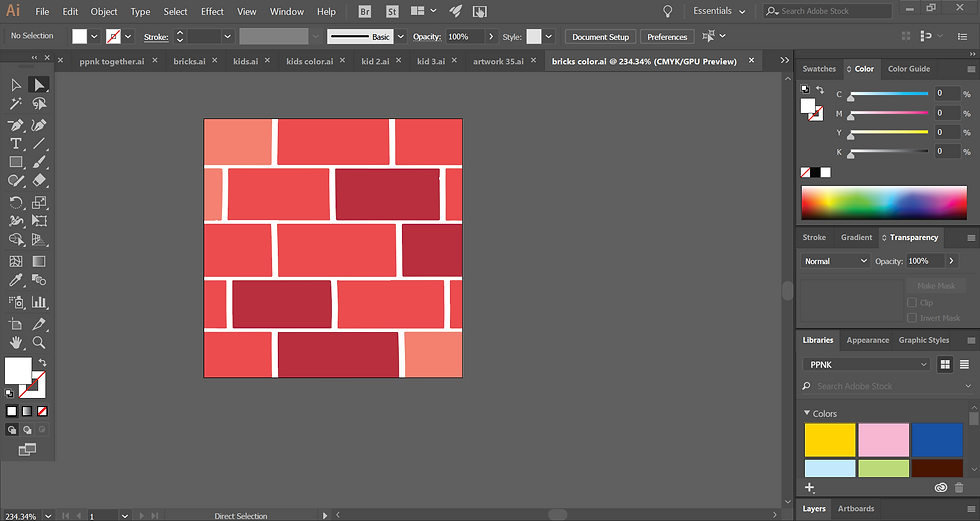
and it has about 1 million different things built in. It’s amazing and super powerful for graphic design, but that's the reason why it can be so overwhelming and difficult to learn even when you’ve worked with it for a long time. There are a lot of different things that you can do with it- and loads of things you never knew you could do with it; for example the other day I found a tool that divides circles into equal parts. I had always seen it, but never known it’s function until I was looking for it.
What is Adobe Illustrator?
Illustrator is a computer software sold by Adobe. Like the name implies it's for illustrating – sort of. Illustrator is usually used for "simpler drawings” and graphic designs that tend to use more shapes and colors and less things like texture or shading, that's not to say these techniques can't be achieved on illustrator, but they're generally done via Photoshop.
What's the difference between Illustrator and other programs like Photoshop?
Illustrator and Photoshop can each handle a lot of the same things that the other does, but there's one crucial difference you need to know. While both programs can be used for illustrating, Photoshop is meant to mimic illustrations you would do without a computer like watercolor or drawing. To do this, Photoshop has lots of different brushes that try and replicate something you could do on paper/canvas using only a computer. To accomplish that effect, Photoshop captures all your colors in pixels (pixels are the tiny squares that screens use to display images). You might already know the term pixels from computer screens or pictures – which makes sense as Photoshop is also used to edit photos. But this leaves the following question: If Photoshop uses pixels then then what is Illustrator using? Vectors. The major difference between Photoshop and illustrator lies with these.
What are vectors?
Vectors are a way the computer knows what to put where (like pixels) but the thing that makes them special is that they never get blurry. You heard that right - it doesn't matter how many times you zoom in, the image stays the same. Basically, with vector the computer is given a specific math formula for each point. So, when you zoom in the computer readjusts the formula and keeps the image clear. This is ideal for things they get resized often like logos or simple designs.
Why aren't vectors used for everything?
That was my question too! The answer is vector doesn't allow for complex shapes the same way pixels do (this makes sense too because Photoshop is meant to mimic paper/canvas art and you don’t zoom in flawlessly to the Mona Lisa). Therefore, something like a photo or brushstroke would need to be awkwardly simplified and smoothed out, leaving a result that wouldn’t look as realistic as something done with pixels.
What is Adobe Illustrator draw?
Adobe Illustrator Draw is the free phone/tablet app version of illustrator, a much, much, much more simplified version. Like really, the only thing that is comparable between the two is the vector graphics. However, I recommend starting out on Adobe draw because it will help you get acclimated to Illustrator a little bit better. Using Illustrator for the first time is an extreme learning curve and using Adobe Draw beforehand can ease you into Illustrator by giving you some experience with bits of the interface- a slight step up from going in head first.
Can Adobe Draw do all the same things as Illustrator?
No.
How much is Adobe Illustrator?
This is some high-end stuff here, so the price is pretty steep to match. However, it's also of super high-quality and I highly recommend using Illustrator if you’re serious about doing graphic design or logos (if you're not that serious yet, maybe look into some similar, free programs. If you are looking at a different digital illustration style, maybe consider Photoshop instead). With Illustrator, you can do thousands of different things- even if you just use 10% of its capability. To get down to the actual numbers, Illustrator is $29.99 per month and $239.88 year. Now, if you're looking to buy more than two Adobe Programs you have another option: Creative Cloud. Creative Cloud is virtually all the adobe apps – and there are a lot (this includes subscription to Adobe Typekit as well, which is like a library of amazing fonts that I highly recommend for anything involving typography). Creative Cloud is $74.99 per month and $599.88 per year, which is more expensive, but it makes sense compared to buying each program individually. This is the plan I have and there are dozens of different apps I can use in addition to the three that I work with almost daily (Photoshop, Illustrator and Indesign). This comes in handy often; for example, when I tried podcasting I already had all the software I needed.
How can you get the price of Adobe Illustrator down?
Adobe offers discounts or special rates to businesses, schools, students, teachers and some non-profits. These can be super helpful in cutting the costs down. Also, keep a lookout for other discounts throughout the year- when I got my Creative Cloud for the first time it happened to be cyber Monday. Paired with the student discount, this cut the cost more than 60%. However, be careful with the discounts because sometimes they renew at different prices.
Hopefully this helps with any of the questions you may have been having before even learning to use Illustrator. Next post we’ll start to go over actually using the software, so stay tuned!
Got a question that was answered in this post or have something to add? Leave it in the comments below!
Additional Resources/ Sources Used in This Post:


Comments